Background
Pictures
Overview
Error Codes
Product Versions
Patches
Relationship to the Percom Doubler and DBLDOS
Percom Data Company
System Disk Programs
TRS-80 DOS - MicroDOS / OS-80
Page Index
Other MicroDOS Navigation
Background
Also Known As:
OS-80 (renamed by 1980); OS-80D (double-density Model I); OS-80/III (Model III version)
Author:
James W. (Jim) Stutsman
Publisher:
Percom Data Company, Inc. — 211 N. Kirby, Garland, Texas 75042 | Phone: (214) 272-3421
Initial Release:
Version 1.00, January 1979 (manual dated January 1979; Version 1.10 released June 4, 1979)
Price (1981):
OS-80: $29.95 | OS-80D: $49.95 | OS-80/III: $49.95
Models Supported:
TRS-80 Model I; TRS-80 Model III; Dick Smith System 80 (popular in Australia/NZ)
TRSDOS Compatible:
No — the only TRS-80 disk operating system making no attempt at TRSDOS compatibility
Memory Required:
Less than 7K RAM — operable on a 16K single-drive system
Disk Footprint:
Sectors 0-19 (first 20 sectors of any disk); approximately 5% of a diskette
Manual:
MicroDOS Disk Operating System Systems Manual, Version 1, August 24, 1979 (Percom Data Company)
Reviewed In:
Creative Computing, June 1980 (favorable); Micro-80 (Australia), Issue 16, March 1981
MicroDOS holds a unique position in TRS-80 history as the only disk operating system for the platform that made no attempt whatsoever at compatibility with Radio Shack's TRSDOS. Where every other alternative DOS of the era — NEWDOS, LDOS, DOSPLUS, MULTIDOS — worked within the TRSDOS framework or emulated its command structure, MicroDOS took a philosophically independent path. It extended Level II BASIC directly, bypassed any notion of a file system, and gave the programmer raw direct access to the disk at the sector level.
Jim Stutsman came to the TRS-80 world via the Motorola 6800 hobbyist scene. In 1978, having built his own 6800-based computer from a kit, he attended a 6800 User Group meeting where he encountered Harold Mauch, founder of Percom Data Company in Garland, Texas. Mauch — a former Texas Instruments engineer who had started Percom making high-speed tape interfaces for S-100 bus machines — convinced Stutsman to leave his regular job and write software professionally.
Percom had already developed a simple direct-sector disk access system for its 6800 platform, one that worked through BASIC extensions rather than a command shell. When Tandy began offering floppy drives for the TRS-80, Stutsman ported that approach to the Z80. Rather than reverse-engineering TRSDOS (which would have been a major undertaking), he adapted what Percom already had. The result was MicroDOS Version 1.00, with a manual dated January 1979. Version 1.10 followed on June 4, 1979. Percom renamed the product OS-80 by 1980, and continued selling it well into 1982.
Pictures
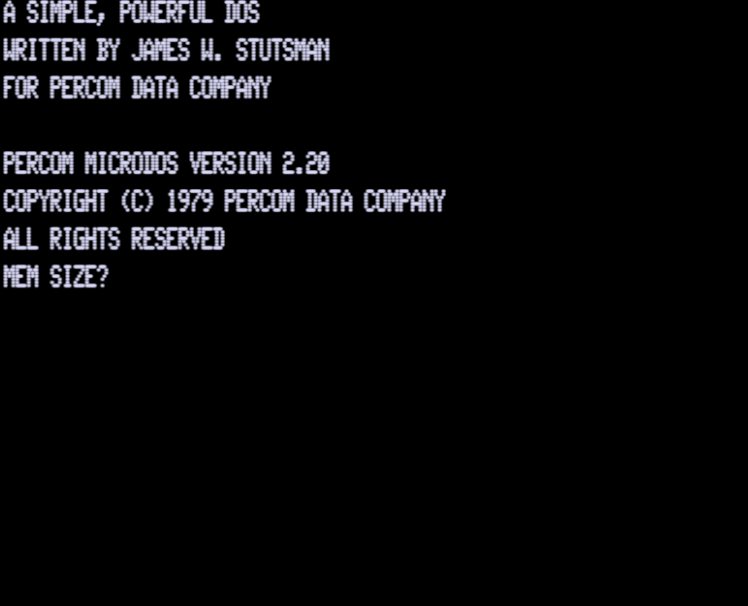
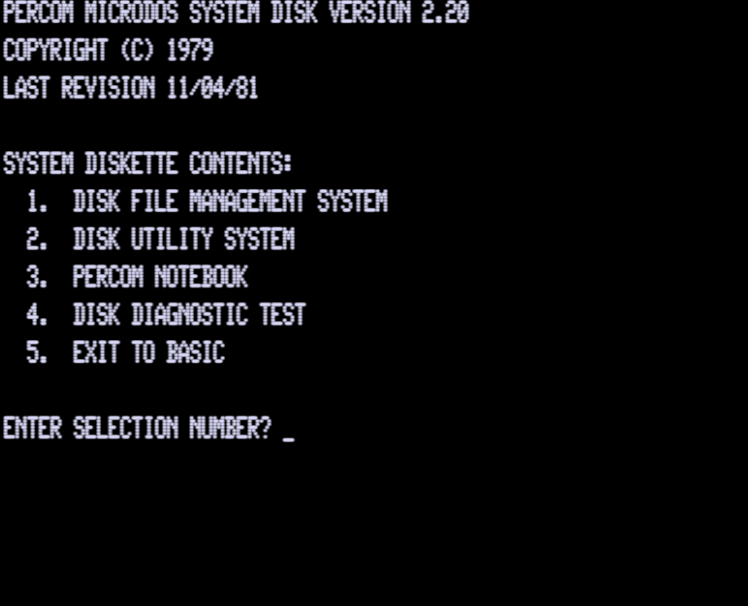
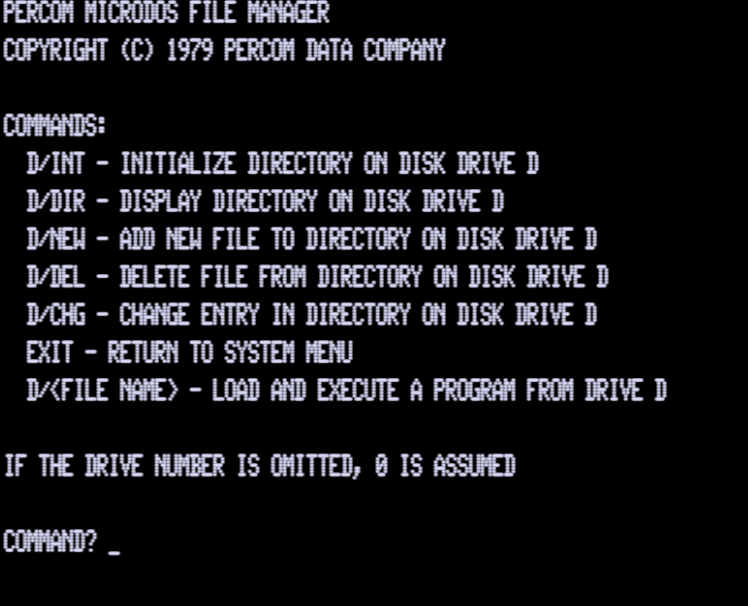
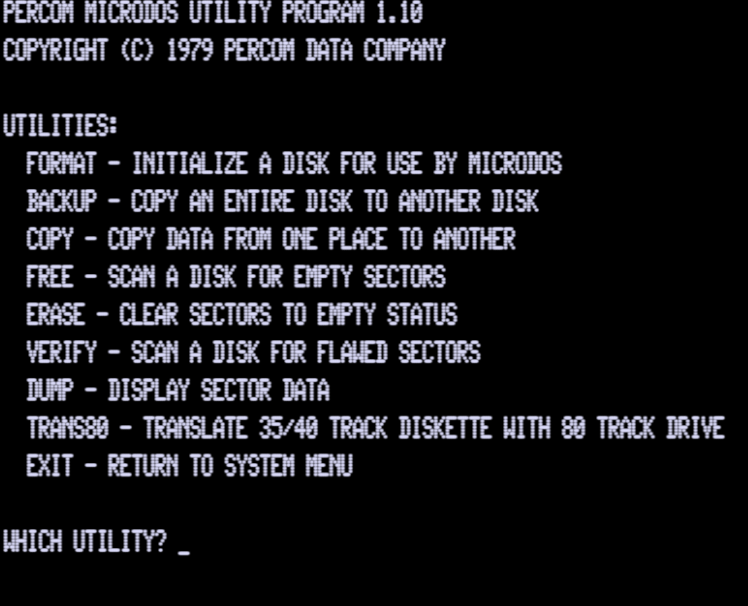
MicroDOS Overview
The philosophy at Percom is stated directly in the manual's opening:
"The philosophy at Percom is that a DOS for a microcomputer should make minimal demands on available resources while providing essential functions in accessing the disk. These functions include program save and load and a simple means of storing and retrieving data. Random access of the disk should be as easy to perform as sequential access. MICRODOS was designed around these principles."
Unlike other Disk Operating Systems, MicroDOS exists in conjunction with Level II BASIC, not apart from it. When the computer is first turned on (or the RESET button is pushed), the Level II ROM loads MicroDOS from the disk on drive 0. After performing some initialization, MicroDOS turns control over to Level II. From that point on all communication with MicroDOS is done through the use of BASIC instructions. There is no separate DOS prompt or command shell.
MicroDOS is recorded on sectors 0 to 19 of any disk it is written on. Once loaded by power-up or reset, it is not necessary to keep the MicroDOS disk mounted. MicroDOS resides entirely in memory and does not need a "system" disk available, as TRSDOS does. Its requirements are small: less than 7K of memory and only 5% of a diskette. This makes a 16K one-disk system quite useful.
Disk files created by MicroDOS are NOT compatible with TRSDOS or other disk operating systems. A utility program exists to read TRSDOS BASIC program files, but programs using disk I/O statements will need to be modified for the MicroDOS BASIC syntax.
MicroDOS was configured for Percom disk drives, which permit operation on 40 tracks with a track-to-track step time of 20 milliseconds. Radio Shack drives are capable of only 35 tracks and will not step faster than 40 milliseconds. Users with Radio Shack drives must apply the following patches:
- To change to 35 tracks: POKE 17554,35 : CMD"M",0
- To change step time to 40ms: POKE 17556,3 : CMD"M",0
Product Versions
The name MicroDOS was phased out in advertising by 1980 and replaced universally by OS-80. A Percom advertisement in the August 1981 issue of 80 Microcomputing described it as: "OS-80, Percom's fast extendable BASIC-language disk operating system, is included on diskette when you purchase an initial drive kit. Originally called MicroDOS, OS-80 was favorably reviewed in the June 1980 issue of Creative Computing magazine." By 1981, Percom offered three distinct versions:
| Version | Description |
|---|---|
| OS-80 | Original single-density version for the TRS-80 Model I. Bundled with Percom's initial drive kits. Retail price: $29.95. |
| OS-80D | Double-density version for Model I computers equipped with the Percom Doubler or Doubler II. Retail price: $49.95. |
| OS-80/III | Version for the TRS-80 Model III, supporting both single- and double-density operation. Retail price: $49.95. |
Percom also sold OS-80 for the Dick Smith System 80, a TRS-80 clone popular in Australia and New Zealand. It also appeared in the Dick Smith Electronics catalog (New Zealand, 1981). A review of the System 80 version appeared in the Australian magazine Micro-80, Issue 16, March 1981.
Patches and Version History
| Version | Notes |
|---|---|
| 1.00 | Initial release. Manual dated January 1979. Verified only as a reported release; source scan not yet checked. |
| 1.10 | Reported release June 4, 1979. Reported changes: format behavior revised; bad sector count exposed via LOC(3); system disk menu auto-loads at power-up. Needs original Percom memo verification. |
| 1.11 | Reported patch memo PM-TFD-100-001 (July 11, 1979). Reported fix: LOAD and MERGE memory-overrun check. Needs original memo verification. |
| 1.12 | Reported patch memo PM-TFD-100-002 (July 11, 1979). Reported fix: SAVE sector-count reporting. Needs original memo verification. |
| 1.14 | No confirmed public details found beyond evidence that a copy exists. |
| 1.15 | No confirmed public details found beyond evidence that a copy exists. |
| 1.21 | No confirmed public details found beyond evidence that a copy exists. |
| 1.22 | No confirmed public details found beyond evidence that a copy exists. |
| 2.10 | No confirmed public details found beyond evidence that a copy exists. |
| 2.20 | No confirmed public details found beyond evidence that a copy exists. |
Percom built a patching facility into the MicroDOS system diskette. A Patch Utility program (stored on sector 40 of system disks from v1.11 onward) allowed patches to be entered and applied without reassembling the DOS. The utility performs three phases: Phase 1 validates the entered patch DATA lines for typing errors; Phase 2 applies the patches to MicroDOS in memory; Phase 3 rewrites the patched DOS to disk via CMD"M".
Relationship to the Percom Doubler and DBLDOS
In 1980, Percom introduced the Percom Doubler, the first successful double-density add-on for the TRS-80 Model I, at an initial price of $219.95. The hardware was designed by Wayne Smith and Harold Mauch; the accompanying software was written by Jim Stutsman. The Doubler installed inside the Expansion Interface by replacing the Western Digital 1771 floppy disk controller chip, requiring no soldering or trace cutting.
The Doubler was bundled with DBLDOS, a version of TRSDOS modified by Stutsman to support double-density operation. Percom also sold OS-80D as a companion product that could work with the Doubler.
The critical technical insight behind the Doubler's software grew directly from Stutsman's work on MicroDOS. The Z80's clock speed was theoretically insufficient for double-density disk transfers using TRSDOS's polled I/O approach. Stutsman devised a different loop structure that gained just enough cycles to make double-density reliable. In a 2008 interview he called it "without a doubt" his proudest TRS-80 accomplishment: "I'm sure that anyone could have figured out the critical loop timing, but it was really cool to be first."
With the notable exception of Model I TRSDOS itself, Percom Doubler support was eventually added to virtually all TRS-80 operating systems.
Percom Data Company
Percom Data Company was founded by Harold Mauch and his wife Lucy, incorporated in Texas on 23 January 1978. The company's origins traced to the November 1975 BYTE magazine symposium in Kansas City, Missouri, which produced the "Kansas City Standard" for cassette data storage. The final standard was co-authored by Lee Felsenstein and Harold Mauch; attendees included Bill Gates. Mauch also published a companion technical article, "Digital Data on Cassette Recorders," in the March 1976 issue of BYTE.
Percom had its roots in the S-100 and SS-50 bus hobbyist markets before expanding into the TRS-80 space in 1979 with the Percom Separator, a corrective add-on for the Radio Shack Expansion Interface's floppy disk controller defect. The company's headquarters were at 211 N. Kirby Street, Garland, Texas 75042 (phone: 214-272-3421). In October 1981 the company relocated to a larger 27,000 sq ft facility in Dallas. At its peak, Percom employed approximately 150 people.
Harold Mauch died suddenly in August 1982. In 1984, Esprit Systems purchased Percom. The Percom Data trademark was formally cancelled in 1990.
Jim Stutsman, the author of MicroDOS and DBLDOS, left Percom after the Doubler project and later wrote software for Montezuma Micro, including Monte's Windows. He reflected in 2008: "It was fun to be involved in the early stages of personal computing, and I'm very glad to have had the experience."
MicroDOS System Disk Programs
The MicroDOS system diskette shipped with four BASIC programs in addition to the operating system. A menu program loads automatically at power-up or reset; press BREAK to exit to BASIC. Control returns to the menu from any program using the EXIT command. All programs occupy sectors 20 onward; the menu is loaded with LOAD 30,R.
Program 1 — Disk File Manager
A BASIC-language file management system demonstrating how directory management can be built using MicroDOS. Maintains a directory of up to 50 files, each with a name (up to 10 characters), starting and ending sector numbers, file type (P for program, D for data), and a 30-character remark field. Commands: INT (initialize directory), DIR (display directory), NEW (add entry), DEL (delete entry), CHG (modify entry). A drive number and slash may precede any command (e.g., 1/DIR). Entering a filename directly will load and run it if it is a Program type file.
Program 2 — Disk Utilities
Classical disk utilities written entirely in BASIC, serving as examples of MicroDOS-based utility programming. Includes:
- FORMAT — Writes control and timing information on a new diskette.
- BACKUP — Copies an entire diskette to another. Uses all available memory for buffers to minimize copy time. Works with a single drive (prompts for disk swaps).
- COPY — Copies a specified range of sectors from one disk to another, or from one part of a disk to another part of the same disk. Uses all available memory for buffers.
- FREE — Searches a diskette for empty sectors (data length of zero) and displays their sector numbers.
- VERIFY — Reads every sector on a diskette and displays those that cannot be read, plus a summary of bad sectors and their percentage of the disk.
- ERASE — Writes empty sectors over a specified range, releasing that space for FREE to detect.
- DUMP — Reads specified sectors and displays their contents as printable ASCII characters. Non-printable characters are replaced with a graphic block character.
Program 3 — The Percom 5¼ Inch Notebook
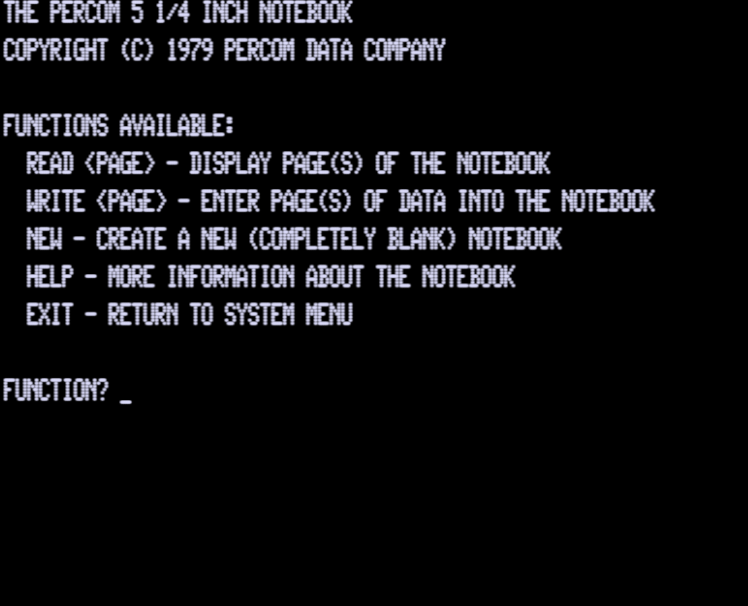
A sample application functioning like a paper notebook. Data is organized as "pages" of up to 15 lines, numbered for access. A Table of Contents on page 0 maps keywords to page numbers. Commands: READ n (display page n, with left/right arrow to navigate), WRITE n (enter up to 15 lines of up to 62 characters each), NEW (generate a blank notebook), HELP (display command descriptions). The notebook comes pre-loaded with information about each MicroDOS Disk BASIC statement. Uses sectors 200-399 of drive 0 by default.
Program 4 — Disk Diagnostic Test
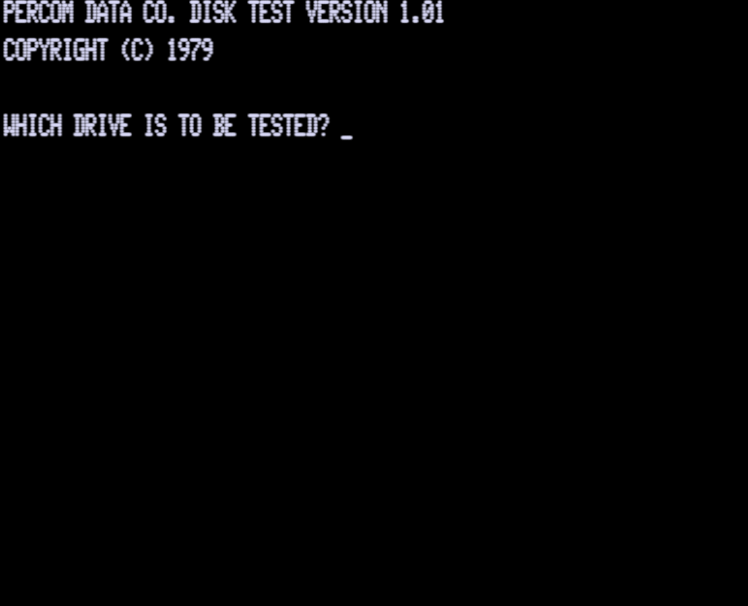
A three-phase disk drive diagnostic. Phase 1: formats the entire diskette under test (destructive — destroys all data). Phase 2: writes a special data pattern to 100 random sectors. Phase 3: reads those sectors back and checks against the pattern, reporting any failures. A summary gives the total error count. Do not run on the MicroDOS system diskette.
Program 5 — Exit to BASIC
Performs a NEW, clears the screen, and displays READY for user programming. Return to the System Diskette menu at any time by pressing RESET or typing LOAD 30,R.
MicroDOS Error Codes
All errors are reported using descriptive error messages. Error code numbers may be derived in ON ERROR routines using the expression ERR/2+1. Error codes 1-23 are standard Level II BASIC errors. MicroDOS-specific errors begin at code 24. Note that MicroDOS errors 24 and above cannot be simulated via the ERROR statement; attempting to do so results in UNPRINTABLE ERROR.
| Code | Message and Description |
|---|---|
| 1 | NEXT WITHOUT FOR |
| 2 | SYNTAX ERROR |
| 3 | RETURN WITHOUT GOSUB |
| 4 | OUT OF DATA |
| 5 | ILLEGAL FUNCTION CALL |
| 6 | OVERFLOW |
| 7 | OUT OF MEMORY |
| 8 | UNDEFINED LINE |
| 9 | SUBSCRIPT OUT OF RANGE |
| 10 | REDIMENSIONED ARRAY |
| 11 | DIVISION BY ZERO |
| 12 | ILLEGAL DIRECT |
| 13 | TYPE MISMATCH |
| 14 | OUT OF STRING SPACE |
| 15 | STRING TOO LONG |
| 16 | STRING FORMULA TOO COMPLEX |
| 17 | CAN'T CONTINUE |
| 18 | NO RESUME |
| 19 | RESUME WITHOUT ERROR |
| 20 | UNPRINTABLE ERROR |
| 21 | MISSING OPERAND |
| 22 | BAD FILE DATA |
| 23 | FEATURE NOT IMPLEMENTED |
| 24 | INVALID DRIVE NUMBER — A drive number was encountered outside the range 0 through 3. |
| 25 | INVALID SECTOR NUMBER — The sector referenced is either negative or beyond the limit of the disk drive for which the current version of MicroDOS was designed. |
| 26 | DISK READ/WRITE ERROR — Despite repeated retries, the disk I/O operation could not be completed. Use LOC(2) to get the exact disk controller status. |
| 27 | DISK WRITE PROTECTED — A write operation was requested but the diskette has a write-protect tab. |
| 28 | DISK OVERFLOW — During a SAVE, the end of the disk was encountered before the last line of the program was written. The program is NOT successfully saved. |
| 29 | DISK MISSING OR DOOR OPEN — A legal drive and sector number were specified, but there is no diskette in the drive, the door is not closed, or the drive motor is not turning. |
| 30 | FIELD OVERFLOW — In a DEF FIELD statement, a single field was defined for more than 255 characters, or the total of all defined fields exceeds 255. |
| 31 | FUNCTION DEFINITION ERROR — A DEF FNx statement was not correctly defined, or an FNx reference was made to a function that was not defined. |
| 32 | INVALID FIELD BUFFER NUMBER — A Field Buffer number was either less than 1 or greater than 4. |
| 33 | DISK DRIVE NOT AVAILABLE — The drive referenced either does not exist or fails to properly select when accessed. |
| 34 | DISK SEEK ERROR — Following a seek operation, the disk controller was unable to verify that the head was on the proper track. |
| 35 | CAN'T FORMAT DISK — Either a write circuitry failure on the drive, or more than 255 sectors could not be verified during format. |