Introduction:
What started off as a utility which could rescue deficient WAV files and convert them to workable images has grown by leaps and bounds to cover all types of conversion and analysis functions. This used to live on the cassette utilities page, but with its expansion, it needs to be moved so its other functions are not ignored.
Downloads and Links:
Important Note:
- On Linux and macOS you’ll need to make the file executable:
% chmod +x trs80-tool - On macOS you’ll additionally have to remove the quarantine:
% xattr -d -r com.apple.quarantine trs80-tool
Major Functionality:
- File identification and archive inventory — info identifies program types, embedded filenames, and disk formats; info --verbose adds details such as floppy geometry, while info --json exposes structured metadata. dir lists files inside cassette and floppy images, optionally including system files. This makes it useful for cataloging collections whose filenames and extensions are unreliable or uninformative.
- Broad floppy-image and operating-system support — Reads JV1, JV3, DMK, SCP raw-flux images, HFE version 1 (HxC and Gotek), and ImageDisk (IMD); .DSK is treated as a generic extension whose underlying format needs identification. The documented filesystem coverage includes TRSDOS (Model I, III, and 4, including 2.7DD/2.8), TRSDOS 6 and LS-DOS 6.3, LDOS, NEWDOS and NEWDOS/80, DOSPLUS, MultiDOS, VTOS, UltraDOS, Percom DoubleDOS and MicroDOS, and RAPIDOS, in single, double, or mixed density and single- or double-sided. As of v4.2.0 it also reads Model II disks (TRSDOS 1.x and 2.0, TRSDOS-II, DOSPLUS II, and Xenix disks that hold a tar archive), FMG's UCSD Pascal disks for the Model I, and a wide range of CP/M formats (Lifeboat, Montezuma Micro, Holmes Engineering, Digital Research CP/M Plus, and the Model II's standard 8-inch, Aton, and Pickles & Trout formats). info names the DOS and its version from what the disk says about itself. The important distinction is that it understands filesystems, not merely disk-image containers, so it can extract individual files rather than just inspect raw sectors. Reading of damaged and copy-protected images is much more robust than in earlier versions.
- File conversion — convert handles conversions such as disk-format machine-language programs (.CMD) to cassette-format programs (.3BN), tokenized BASIC to text, and WAV cassette recordings to CAS images. It can also combine multiple programs, or the contents of a whole floppy or cassette, into a single cassette image or audio file. This is its central bridge between archival formats, emulator inputs, and cassette-loading workflows. It is not a universal disk-image writer; the tool can only read floppy disks, not write them.
- File extraction — extract (new in v4.0.0; this used to be part of convert) writes every file inside a floppy image, CAS file, or cassette WAV into a directory. Files on damaged floppies are written anyway, with unreadable sectors filled with zeros and the problem reported; --mark-damaged also tags their names with [DAMAGED]. CP/M text files are clipped at their Ctrl-Z, UCSD Pascal text files are converted to plain text, Xenix tar disks keep their directory structure, and files whose names differ only in case are not overwritten.
- BASIC listing recovery and interchange — Reads both tokenized and plain-text BASIC, writes tokenized .BAS, and uses .ASC for non-tokenized text output. For example, trs80-tool convert in.bas out.asc produces a readable listing. That provides a practical route for examining, editing, searching, or version-controlling BASIC programs without first loading them into a TRS-80. The changelog also documents EDTASM-to-text conversion support.
- Cassette decoding and audio generation — Accepts WAV recordings at arbitrary sampling rates, with 8- or 16-bit samples and mono or stereo audio. It can decode recordings into program files, generate WAV/CAS output, preserve a detected cassette baud rate, or override it with --baud. Level I 250-baud files are also supported. This functionality supports both recovering programs from recordings and creating cassette audio from existing digital files.
- Disk-condition analysis and binary inspection — sectors maps tracks and sectors, distinguishing single/double density, deleted sectors, missing sectors, and CRC errors. sectors --bad goes further by identifying which files, if any, occupy damaged sectors; --contents displays their data. The annotated hexdump command complements this with byte-level inspection. The file-to-bad-sector mapping is particularly valuable for deciding whether a damaged image affects an important program or only unused space.
- Z80 assembly and program generation — asm assembles source into .CMD, .3BN, .CAS, .WAV, .BIN, or Intel HEX, with optional listing files. That covers ordinary program development, cassette distribution, and ROM/EPROM-oriented output. The documented assembler includes expression support and various zmac-compatibility improvements, although the page does not claim complete zmac compatibility.
- Disassembly and reverse engineering — disasm understands load addresses in program files, accepts explicit origins for raw ROM/BIN files, and attempts to separate code from data by following execution paths. Additional entry points help with relocated programs; --full forces sequential disassembly. Output options include labels, known ROM references, ASCII comments, and formatted listings. It also handles certain system-file overlays and raw boot-sector dumps. Its main caveat is that automatic code/data classification remains heuristic and may need manual guidance.
- Terminal-based TRS-80 emulation — run emulates Models I, III, and 4, supports BASIC-level selection, launches programs or boot disks, and mounts cassettes and multiple floppy images. This offers a quick execution check within a command-line workflow, but the author labels it experimental, unsuitable for some games, and potentially nonfunctional in a Windows shell. Mounted floppy changes can be written back to the image unless --write-protected is used.
- Interactive Z80 experimentation — repl lets you enter assembly instructions, assemble and execute them, and inspect their effects on registers and flags. Unlike run, this is a bare Z80 environment without TRS-80 ROM or peripherals. It is therefore better suited to testing instruction behavior and small code fragments than to running complete TRS-80 software.
- AI-controlled emulation through MCP — mcp exposes a persistent emulator to compatible AI clients, including a documented Claude Code setup. An assistant can boot a machine, load BASIC or binary programs, mount disks, type or hold keys, inspect memory and registers, single-step, and run until a specified address, screen message, or memory value appears. This is substantially more capable than asking an AI to reason about a listing alone: it supplies an execution environment in which the assistant can test its conclusions.
- Performance measurement and visual capture — The MCP interface supports program-counter profiling, routine calls with chosen register values, and cycle-based timing. Memory-triggered waits provide precise timing boundaries, while screen-text waits are described as approximate. It can also save PNG screenshots and record MP4 video at intervals based on emulated time; video recording requires ffmpeg. Together, these features support optimization work and reproducible demonstrations of program behavior.
Supported Formats:
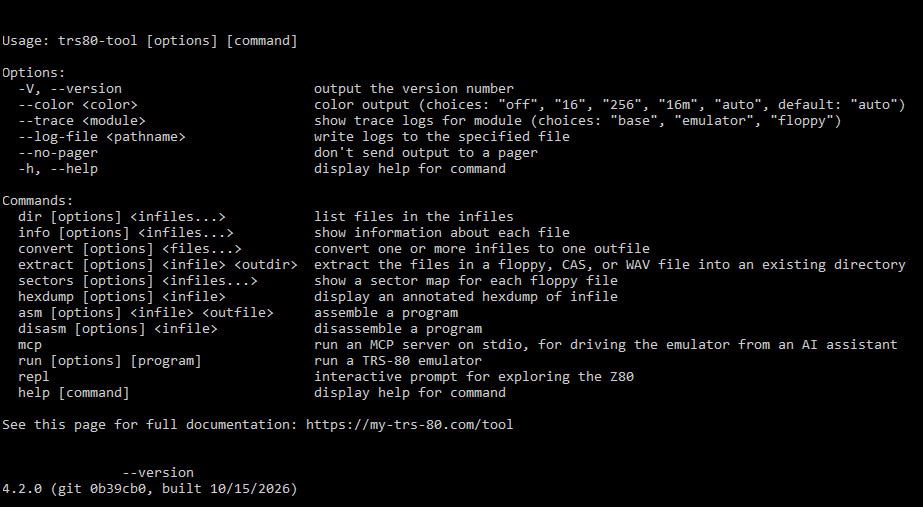
TRS80-TOOL supports the following formats:
Command Line Options:
Command line options are as follows:
Options:
FLAGS
The tool detects the terminal's color capabilities automatically and honors the NO_COLOR and FORCE_COLOR environment variables. The dir, info, sectors, hexdump, and disasm commands send their output to a pager when it's going to the terminal. The pager is TRS80_TOOL_PAGER if set, then PAGER, then less (Windows only pages if one of those variables is set). Set it to cat or use --no-pager to turn paging off.
ARGUMENTS
trs80-tool extract ...
in.dmk outdir
Extract the files from a DMK file to a directory
in.cas outdir
Extract the files from a CAS file to a directory
in.wav outdir
Extract the files from a WAV file to a directory
--system in.dsk outdir
Include system files from the floppy
--mark-damaged in.dmk outdir
Damaged files are always written (unreadable sectors filled with zeros); this also adds [DAMAGED] to their names
--lowercase in.dsk outdir
Write the files with lowercase names
--cpm-records in.dsk outdir
Keep CP/M text files' whole 128-byte records instead of stopping at the Ctrl-Z
--ucsd-pascal-raw in.dsk outdir
Write UCSD Pascal text files as they are on the disk instead of converting them to plain text
Tools the assistant gets: boot, load_program, mount_disk, reset, load_basic, type, key, run, step, run_until_pc, run_until_screen, run_until_memory, screen, read_memory, write_memory, registers, search_memory, disassemble, profile_pc, call_routine, screenshot (PNG), and record_start/record_stop (MP4, needs ffmpeg). Timings are reported in Z80 clock cycles (t-states), so they're exact and repeatable.
trs80-tool asm ...
program.asm program.cmd
Assembles program.asm into program.cmd. Output can be .CMD, .3BN, .CAS, .WAV, .BIN, or .HEX
--baud 1500 program.asm program.cas
Assembles program.asm into a 1500 baud CAS file.
--listing program.lst program.asm program.cmd
Assembles program.asm into a program.cmd with a listing file of program.lst.
trs80-tool disasm ...
saucer.cmd
Disassembles saucer.cmd
--org 0x8000 file.bin
Disassembles a raw file.bin with an ORG of 8000H
--entry 0x0000,0x3799,0x377B model3.rom
Disassembles a ROM, also following the listed entry points
--data-comment --upper --full --no-labels --listing --no-known --hex-format h boot.sys
Disassembles boot.sys to look like a TRS-80 disassembled it
trs80-tool run ...
--model 1 --level 1
Starts a Model I Level 1 Emulator. Choices are Model I, III, and 4, Level 1 and Level II.
tdos13a.dsk
Runs an emulator and boots tdos13a.dsk
frogger.cmd
Runs an emulator and loads and runs frogger.cmd
--mount in.cas in1.dmk in2.dmk
Mounts a cassette, and floppies in consecutive drives starting at 0. Changes made to a floppy are written back to the image file.
--write-protected --mount in1.dmk
Mounts all floppies as write-protected
--xray
Starts a web server for the X-ray debugger instead of showing the machine in the shell (experimental, undocumented)
The convert option is quite powerful and has arguments of its own: --baud, --entry, --start, --system (include system files from floppies), and --cpm-records (keep whole CP/M records). Here are SOME examples:
trs80-tool convert ...
--system in.dmk out.wav
Diskette to WAV, including the system files
in.cmd out.3bn
CMD file (Diskette) to SYSTEM format (Cassette)
--start 17408 in.rom out.cmd
Raw Image file to CMD format, with a load address of 17408
in.bin out.3bn
Raw Image file to SYSTEM format
in.bas out.asc
Detokenize file
in1.bas in2.3bn in3.cmd out.wav
3 files into a WAV file (including converting CMD to SYSTEM)
in.dmk out.wav
Diskette to WAV
in1.cas in2.cas in3.cas out.wav
3 CAS files into a single WAV file
in1.bas in2.3bn out.wav
BAS file and SYSTEM file into a single WAV file
in.cmd out.lst
Disassemble CMD file
in.3bn out.lst
Disassemble SYSTEM file
in.wav out.wav
Clean and radically shrink the size of a WAV file
trs80-tool convert --baud ...1500 in1.bas in2.3bn out.wav
BAS file and SYSTEM file into a 1,500 Baud WAV file
trs80-tool convert --start ...17408 in.cas out.cas
Set the start address to /17408
auto in.cas out.cas
Set the start address to its best guess
trs80-tool convert --entry ...0x7059,0x7064,0x71B9,0x7263 lower.cas lower.lst
Disassemble the cassette file LOWER.CAS to LOWER.LST but treat locations 7059H 7064H 71B9H and 7263H as entry points. This will stop the disassembler from wrongly assuming relocated code is actually an ascii string.